
Which Links Bring In Your Paying Subscribers? How to Track Subscription Conversions
In 30 days of tagged links, one regional lifestyle magazine traced 277 conversions, 22 of them paid, and $1,276.98 in subscription revenue back to the exact links that earned them. Here's how to tag your links in 10 minutes, which links to tag first (including the one on your login page), what one magazine's sources revealed, and why you should rank sources by paid conversions and dollars instead of sign-ups.

Publisher Summary
In 30 days of tagged links, one regional lifestyle magazine we work with traced 277 conversions, 22 of them paid, and $1,276.98 in subscription revenue back to the exact links that earned them.
That’s what it looks like to track subscription conversions by source. Instead of “traffic from Instagram,” you see which link a paying reader clicked, and what they paid. It takes a few minutes of setup and one month of patience.
Why Clicks Don’t Tell You Who Paid
Without tags, your subscription revenue comes from “somewhere on the internet.”
You might think your analytics already covers this. Google Analytics can tell you a visit came from Instagram. Tying that visit to a Stripe payment takes custom event setup that many publishers never finish.
So your traffic reports count visits. The question that pays the bills is which links bring in readers who subscribe.
A UTM tag closes that gap. It’s a few extra characters at the end of a link, like ?utm_source=instagram. Anyone who clicks carries that label, and if they subscribe, your subscription tool can tie the sale to the link.
How to Tag Your Links in 10 Minutes
Start with the links you already share everywhere.
A tagged link looks like this: yoursite.com/subscribe/?utm_source=instagram&utm_medium=social&utm_campaign=bio-link. Google’s Campaign URL Builder writes them for you. Use lowercase and one name per channel, or “Instagram” and “instagram” show up as two different sources.
Tag these first:
- Your Instagram or social bio link
- The subscribe buttons in your newsletter
- The subscribe link on your print circulation or login page
- Any link a partner or sponsor shares for you
The login page is the easiest one to skip. Lapsed subscribers, print subscribers looking for digital access, and readers who followed a shared link all land there on purpose. Untagged, the subscriptions it drives get lumped in with direct traffic.
What One Magazine’s Tags Showed in 30 Days
The ranking of sources is where tagging starts to pay off.
For that regional lifestyle magazine, the top source was its Instagram bio link, run through the Later app. Second was the magazine’s own tag for its site and newsletter. After that came its print circulation login, Meta, chatgpt.com, a second Instagram tag (“ig”), and a referral from a local museum partner.
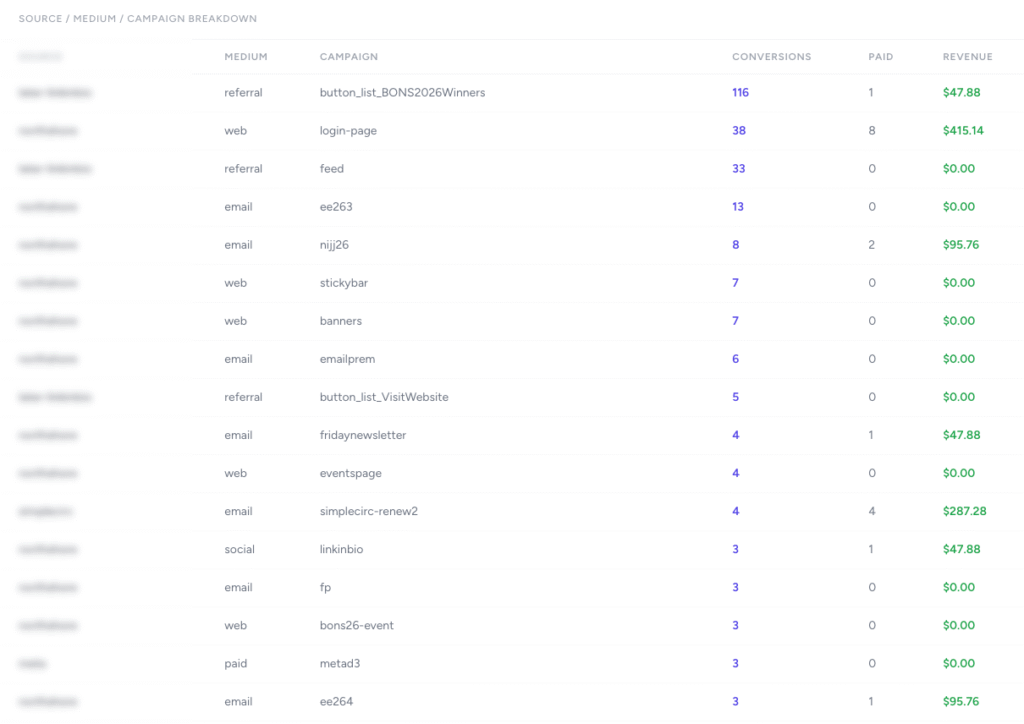
The sharpest spike came from two channels working together. The Instagram bio link and the site tag spiked on the same day, when a newsletter send and a bio update went out together. Daily conversions jumped from a handful to roughly 50 to 60 in 24 hours.
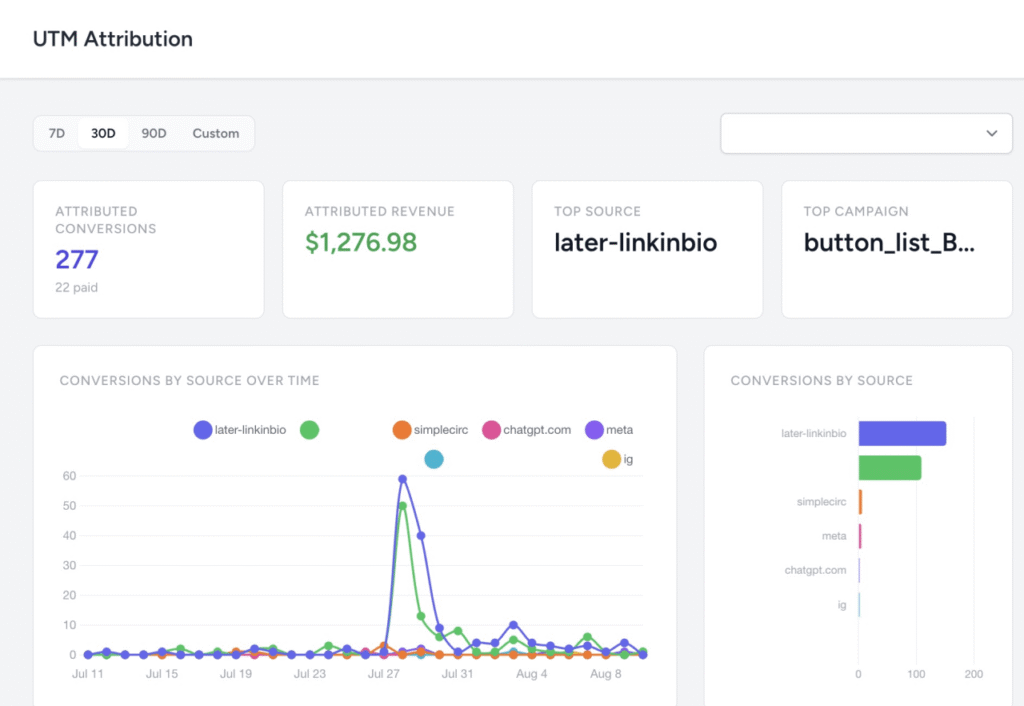
The print login result matters too. A print circulation login showing up as a source means print subscribers are moving into digital. Default analytics often misses it.
Count Paid Conversions, Not Sign-Ups
A source that brings in sign-ups and a source that brings in money aren’t always the same source.
Of the magazine’s 277 attributed conversions, 22 were paid. A source that drove a lot of free registrations could still be well down the list on revenue. So rank your sources two ways: by paid conversions and by dollars.
Your best earner may not look like a sales channel at all. Small Boats Monthly tracks about 20 inbound sources with UTM codes, and its top converter is a welcome email sent an hour after signup.
Leaky Paywall’s Subscriber Insights ties each tag to the Stripe transaction, so source, conversion, and dollar amount sit in one report.
What to Do With What You Find
Thirty days of tagged links give you four decisions to make.
Move your time. If one channel outperforms another about 5 to 1, shift your effort toward the winner.
Test your spend. Give every sponsor, partner, and ad its own tag. After 30 days, you’ll see whether it produced subscribers or only clicks.
Watch print move to digital. If your print login shows up as a source, your print readers are already crossing over. Make that path easier.
Keep an eye on AI referrals. They’re still small. Per Chartbeat data reported by Nieman Lab, AI sources like ChatGPT account for less than 1% of publisher pageviews, even after ChatGPT pageviews more than tripled year over year.
But a chatgpt.com conversion in your report means some readers already find you through an AI chat and subscribe. Tracking it now lets you see it grow.
Key Takeaways
- Analytics shows where visits came from. UTM tags show which links brought in paying subscribers.
- Tagging a link takes minutes. Use lowercase and one consistent name per channel.
- Tag the links you already share: your social bio, newsletter buttons, print login, and partner links.
- Rank sources by paid conversions and revenue, not sign-ups. Your best earner may not be your biggest traffic source.
- Give it 30 days, then shift time and spend toward the sources that pay.
Try This Week
Add a subscribe link to your login page if it doesn’t have one, and tag it with utm_campaign=login-page. Tag your social bio link too, then check both in 30 days.
Resources Mentioned
