
Split the List: How to Run Free and Premium Newsletters That Convert
One newsletter for everyone waters down your upgrade pitch. Split your list into free and premium versions so each one does its job.

Episode Summary
- One newsletter going to everyone limits your ability to convert. Split it into a free version and a paid version so you can message each audience clearly.
- Your free newsletter carries excerpts, links back to your site, and a standing upgrade pitch. Your paid newsletter drops the upgrade pitch and adds value (full text, early delivery).
- Tag every reader free or paid in your email tool. Leaky Paywall mirrors the tag automatically when a free reader pays, so the right newsletter always goes to the right person.
- Salem Reporter raised over $4,000 for a records request using Stripe payment links sent through their newsletter, beating their old donation system.
The Playbook
Most publishers send one newsletter to everyone. That is the problem.
You have two kinds of readers: free registered readers and paid subscribers. When you message both with one email, you can’t speak clearly to either. You water down the upgrade pitch for free readers, and you waste a paid subscriber’s attention asking them to buy something they already bought.
Pete and Tyler break down a fix that takes one or two tweaks: split your existing newsletter into a free version and a premium version. You already have the content. You’re mostly changing the language and the tagging.
First, a reality check. Pete talked to a publisher who had 700 people split between free registered users and paid subscribers and had never sent a single newsletter. The free registrations were close to worthless. Without a newsletter, you have no direct channel to pull readers back to your site, chew through their free article allotment, and trigger the upgrade message. If you take nothing else from this episode, start sending something.
What Your Free Newsletter Should Do
The free newsletter is your conversion engine. Build it around three things:
- Excerpts and links, not full articles. Title, excerpt, link back to your site. The point is to drive readers back, chew up their free allotment, and trigger the upgrade-to-pay message.
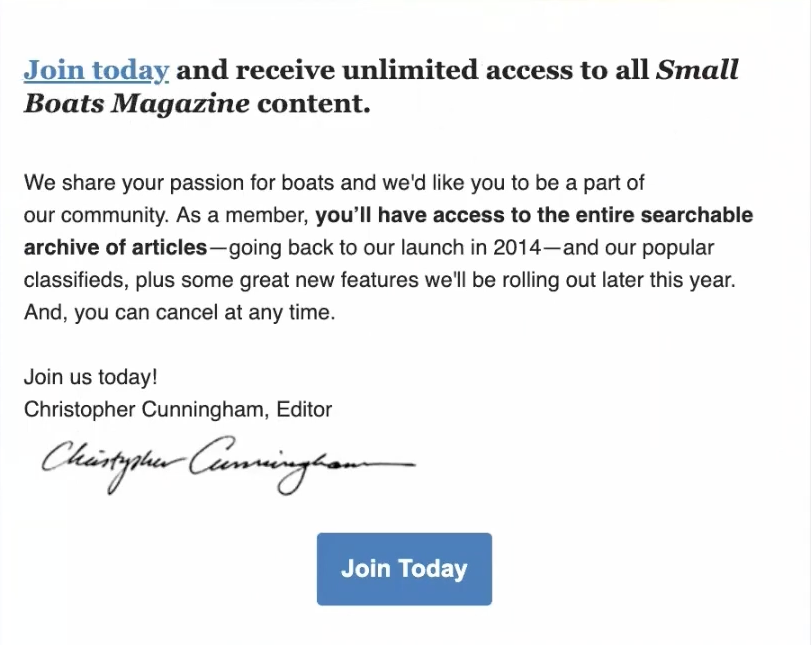
- A standing upgrade section. Every free newsletter should promote your paid subscription. Small Boats Monthly runs a “join today and receive unlimited access” pitch in their free newsletter. Free readers see it every send. Daily or weekly, the upgrade message is always in front of them.
- A sponsor, if it fits. Free readers are a clean inventory to sell. One publisher had a local bank sponsor their free plan and named the plan after the bank, a “brought to you by Hometown Bank” arrangement. It worked. A publisher in Australia sells branding on both the free registration form and the free newsletter. You can package the registration form and the newsletter together for one sponsor.
The piece that makes all of this work is tagging. When someone registers for free, they get tagged “free” in your email tool. That tag is how you target them. With Leaky Paywall, the tag mirrors automatically: a reader is tagged free when they register, and the moment they pay, the tag flips to paid. Your automation handles the rest. Free goes to free. Paid goes to paid.
What Your Premium Newsletter Should Do
The premium newsletter is your new paid product, and it gives you something concrete to promote on your signup page.
Most signup pages list “full access” and “our newsletter” as benefits. Add “our premium newsletter, only for paid subscribers” and the offer gets stronger. Readers pay for packaged, curated information. The paid newsletter world is large for a reason: a newsletter is a packet of helpful information delivered to you, no clicking around required. That has worked in print for decades and it works in digital now.
Here is the easy build: clone your free newsletter, remove the upgrade messaging (these readers already paid), and add value. A few options that work:
- Full text instead of excerpts. iPolitics does this. Paid readers want to read the morning news straight from their inbox while they get ready, no clicking and logging in. Since only paid subscribers get the full-text version, you cut down on password complaints and support tickets at the same time.
- Early delivery. iPolitics sends the premium email out very early, around 6 a.m., and free readers get the news later. If you schedule your sends, timing alone becomes a paid benefit. Print publishers: your e-edition is usually finished a day before it goes out in print. Send it to paid subscribers a day early. They get to see the paper before it hits print, which is real value.
- An upgrade or donation path. There is no subscribe pitch in a paid newsletter, but there can be a different ask: a special product, or a donation campaign. Mission-based publishers should treat paid subscribers as the best donation target. Drop a donation message in for a month-long campaign.
Donations Through Stripe Payment Links
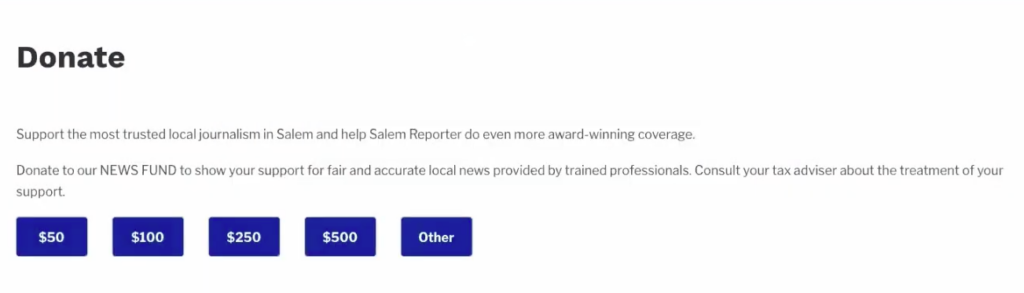
Salem Reporter needed about $4,000 to cover a public records request tied to reporting the community cared about. They ran a call to action in their newsletter explaining the situation, with buttons for $50, $100, $250, and $500 linking straight to Stripe checkout. Readers could also type in a custom amount. No login, nothing tangled up in their existing subscription system.
They exceeded the $4,000 goal quickly. It worked better than the donation system they were migrating away from.
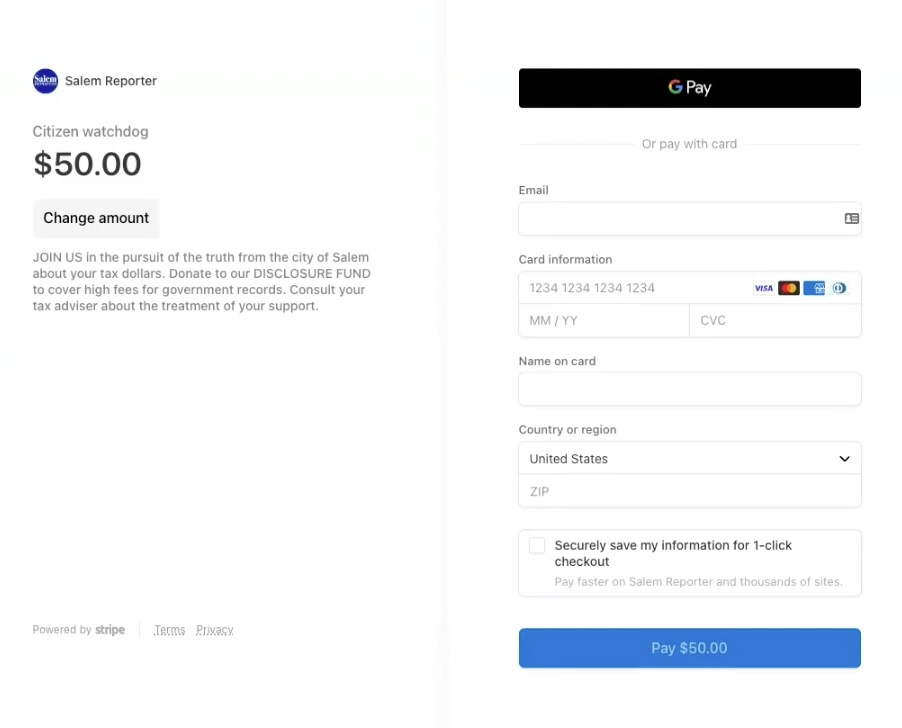
Stripe payment links are a single purchase through your existing Stripe account. You create a button, link it, and you are collecting funds. If donations become a regular thing, you can make a permanent donation level inside Leaky Paywall instead, with a low-to-high range and its own access rules. Either way, the path stays clean.
If You’re Not Even Sending Yet
Don’t let perfect be the enemy of sent. If you have no newsletter, set up automated RSS sending through your email tool. It will not be the prettiest email in the world, but readers get the information and you are moving forward. Customize it later, when you have time. Even a plain setup lets you run two campaigns, one targeting your free tag and one targeting your paid tag, each with the right messaging, fully automated.
Key Takeaways
- Set up two automated campaigns from the start: one targeting your free tag, one targeting your paid tag. The structure matters more than the polish.
- Free readers are sellable inventory. A sponsor on the registration form plus the free newsletter is a package you can take to a local business.
- Full-text delivery to paid subscribers does double duty: it adds a real benefit and it cuts password and login support tickets.
- Early delivery costs you nothing if you already schedule sends. For print publishers, sending the finished e-edition a day early is found value.
- For one-off fundraising, Stripe payment links beat a full subscription flow. No login, custom amounts, money in your existing Stripe account.
Try This Week
Confirm your email tool is tagging readers free and paid so each list gets the right send. Then clone your current newsletter, strip the upgrade pitch from the paid version, and add one paid-only benefit (full text or a day-early send).
Watch the Episode
Resources Mentioned
